
X-RAY VISION

Updated: Apr 18
Seeing good UX by playing older installments of games
Hey folks, and welcome back to Player Experience!
Have you ever tried to explain to someone what UX Design is? Not an easy feat. When you point at a piece of bad game design and explain why it’s bed, it usually clicks for people. But when you point out a piece of good UX design, people scratch their heads. “This was designed? It seems totally arbitrary.”
Good UX isn’t flashy. It doesn’t hold up a big sign that says “hey check out how great I am.” It’s subtle; natural; and best case scenario? It’s invisible.
Why does it seem arbitrary to non-UXers? Because good UX isn’t flashy. It doesn’t hold up a big sign that says “hey check out how great I am.” It’s subtle; natural; and best case scenario? It’s invisible.
But if a UX Design is so great you don’t even notice it, how can budding or even experienced UX designers “see” a good design? Well, lucky for us gamers, I recently stumbled onto a great way to “see” a good UX Design.
NEW VS. OLD

I just started playing the Yakuza series, starting with the shiny prequel on PS4, Yakuza 0. While 0 takes place chronologically before the events of the other Yakuza games, it’s a modern game with a solid UX design. In fact, I didn’t realize just how solid it was until I went back to check out the other Yakuza games, starting with the PS3 title Yakuza 4. And, hoo boy, let me tell you - going from the clean UX design of Y0 to the clunky menu system in Y4 is painful.
When I was playing Y0, its elegant UX was exactly what it should have been: invisible. I used and understood menus with hardly a thought. It allowed me to focus on the game and didn’t frustrate or confuse me. Long story short: I hardly noticed it. Then I got into Yakuza 4, and it’s ALL I noticed.
SKILL TREE
Let’s start with the skill tree - here, Y0 has a relatively classic way to unlock skills.

I won’t go into all the reasons this tree is well-designed just yet. Let’s look at Yakuza 4’s skill tree first.

Yikes, right? And here’s the thing - from a UX standpoint, this menu is serviceable. The locks tell you what you can’t open yet, and when you “hover” (moving through the menu with your thumbstick/D-pad is about as close to hover as you get on console, though there is a new trend of using a thumbstick mouse) over the locked ability it tells you what you need to unlock it. It organizes the different moves as well.
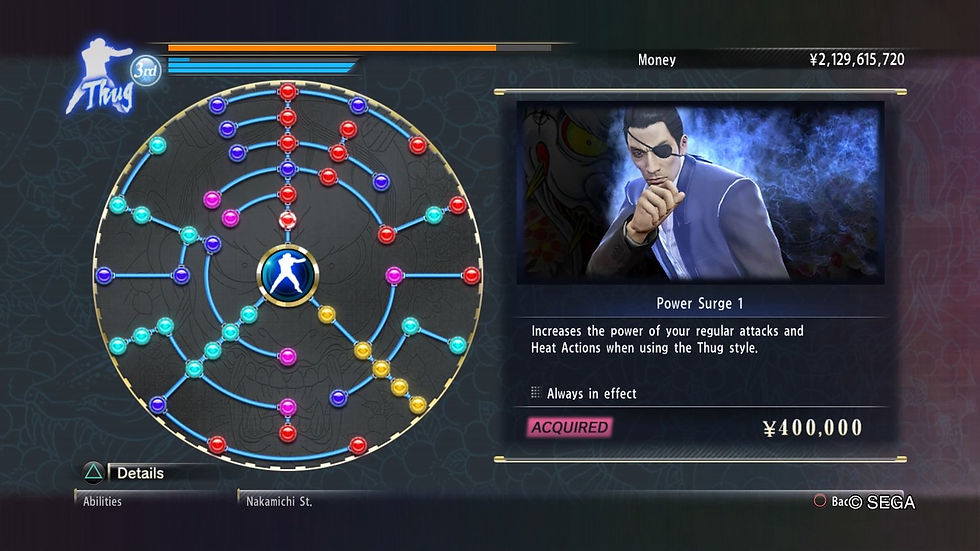
But looking at it beside Y0’s skill tree, suddenly you see all the problems that got fixed between Y4 and Y0. You start at the epicenter of this circle, and have three branches of gems. It’s visually clear that you need to unlock certain gems to gain access to others in the tree. Because of the way this tree is visually laid out, we implicitly understand how the branches extend out from one another.
Yakuza 4’s skill tree isn’t horrible, but it’s very obvious that Yakuza 0’s is far superior. And because they’re essentially the same system, you can compare apples to apples, and see the individual changes they made to make it better. This kind of observation makes you conscious of your UX decisions, and all the tiny working parts that go into a good UX Design.
KAMUROCHO
Let’s look at another piece of UX very important to the Yakuza games: the map.

While most people would say that Kazuma Kiryu is the main character of the Yakuza games, I would argue that the main character of the Yakuza games is Kamurocho - the fictional(a parody of actual district Kabukicho) red-light district of Tokyo where the games largely take place. It’s nothing like a sprawling city in, say, GTA or Assassin’s Creed. It’s a tiny, highly-detailed, lively, intimate neighborhood packed to the gills with personality. In short - it’s an extremely important part of why and how these games work. Therefore, navigating should feel fun and natural, and in Yakuza 0, it does.
The PS4 controller's touchpad brings up the map, and the cancel-button dismisses it. This is great for a quick way to gain your bearings, and essential to memorizing the neighborhood. It also has an intuitive way to scroll around the map via R1, R2, and the joystick.
But in Yakuza 4, things aren’t so simple. You need to pause, then navigate through a menu to get to the map.

Doesn’t sound like a big deal, unless you're used to the breezy, one-button access of Yakuza 0. This was far and away the more obnoxious difference, because more than being about understanding the menu, this was about the flow of gameplay. In 0, the map was well-integrated into the natural flow of navigation. In 4, it was separated from that flow by a menu, and it broke you out of that flow. Considering how important travelling the streets is, this was a small change that made a major difference. And if I hadn’t played an older installment of the game, I would have never noticed!
So that’s my secret: play the newest iteration of a game series first, then play an older iteration. You’ll see the difference everywhere! It’s like a pair of X-Ray goggles that lets you see exactly where the UX improvements were made.
Good luck, and have fun out there!


Comments